

Virtual learning can be a little more of a challenge than being in a classroom surrounded by other participants. Here are a few tips to help keep you focussed during an online training session.
How to set up your virtual computer training session
- If possible, set yourself up with two monitors on extend mode (this will allow you to watch your facilitator on one screen while you are practising on the other);
- Switch to your desktop (Window + D > right mouse click the desktop and choose Display Settings > scroll down to Multiple displays and select Extend these displays)
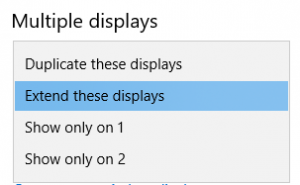
- Switch to your desktop (Window + D > right mouse click the desktop and choose Display Settings > scroll down to Multiple displays and select Extend these displays)
- Turn your mobile phone off (or a least set it to silent mode);
- If you are using an online conference tool like Zoom or Webex, however, you also have Microsoft Teams installed, set your Teams status to Do Not Disturb (DND); and
- Ask questions! Your trainer will appreciate it and so will the other participants.
Our Computer Training Courses


Office 365
Learn how to achieve more with innovative Microsoft Office 365 apps and intelligent cloud services.

Adobe
Learn how to use these powerful graphic design programs and develop an efficient design workflow.


Proud Business Services Sydney
Virtual and Face-to-Face Computer Trainers
Proud Business Services is a Northern Beaches based computer training company offering virtual and face-to-face (in person) computer courses. Our goal is to help your organisation achieve their computer software and IT learning goals quickly so acquired skills can be applied immediately back in the workplace thereby increasing productivity and efficiency.